A supplier sends an invoice. You go to book the input VAT, and on a hunch you run a TRN verification check on the Federal Tax Authority portal. The number comes back invalid. Or worse, it comes back valid but tied to a completely different company name. Now you have a decision to make before your VAT return is due, and getting it wrong can cost you the input tax claim plus a penalty.
Most UAE businesses treat a Tax Registration Number as something a supplier either has or does not. In practice, a TRN can be fabricated, cancelled, or simply mistyped, and any of those turns a tax invoice into one you cannot legally claim against. The good news: verifying a TRN takes under a minute and is free. The part that needs judgment is what you do when the result is not clean. Verifying a TRN goes hand in hand with corporate tax registration.
This guide, written by the FTA tax agent team at Best Solution, walks through how to verify a TRN, how to read every type of result, and the specific traps (EmaraTax lookup lags, branch numbers, and the new corporate tax number mix-up) that catch businesses in real VAT reviews.
TRN facts
How do you verify a TRN in the UAE?
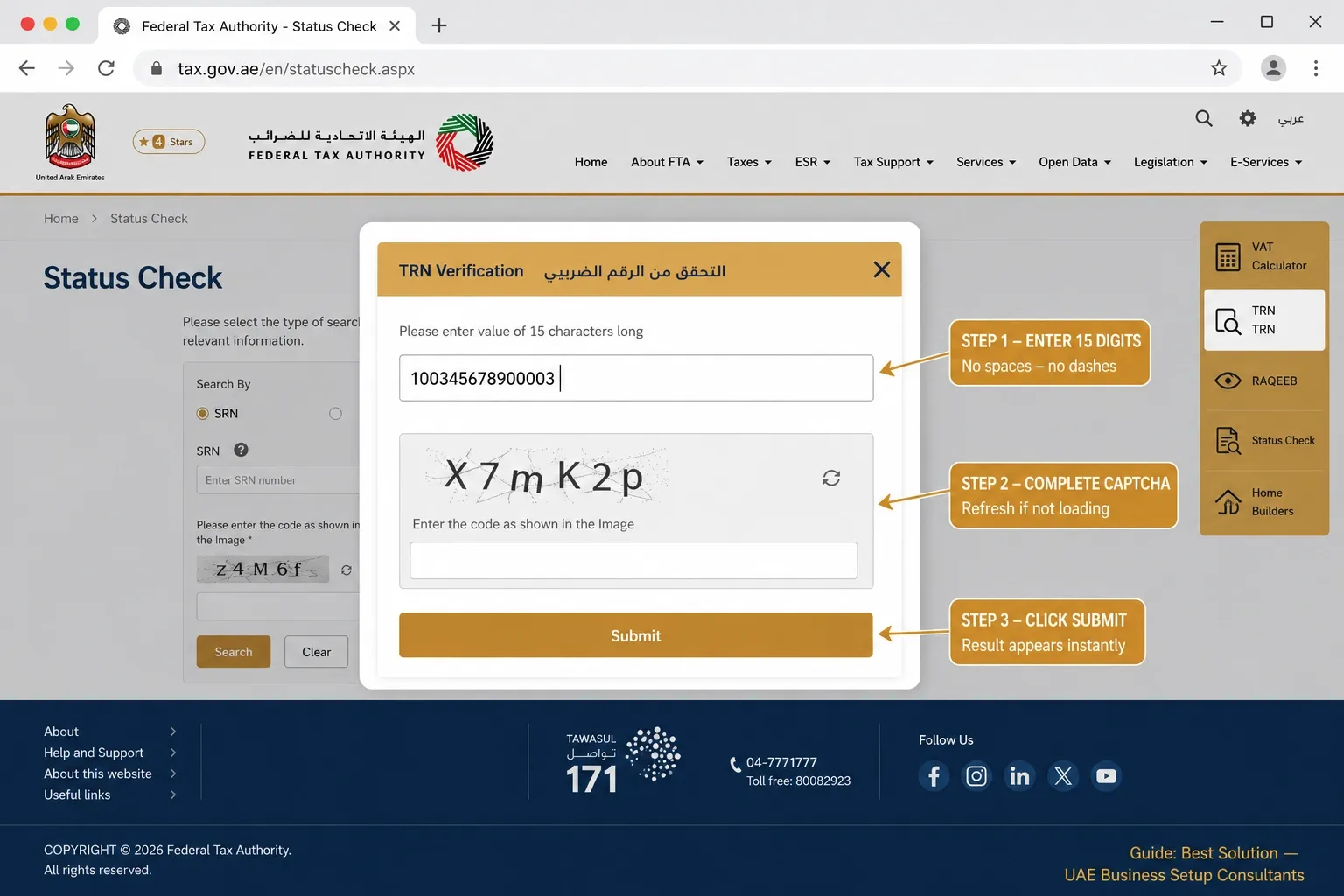
To verify a TRN in the UAE, open the Federal Tax Authority EmaraTax portal at tax.gov.ae, select TRN verification, enter the 15-digit Tax Registration Number, and complete the captcha. The tool then shows the legal name registered against that TRN. If a name appears, the TRN is valid; if not, it is invalid or unregistered.
What is a TRN, and what do the 15 digits mean?
A Tax Registration Number (TRN) is the unique 15-digit identifier the Federal Tax Authority (FTA) issues to every business or person registered for tax in the UAE. VAT was introduced on 1 January 2018, and the TRN is what allows a registrant to legally charge VAT, issue valid tax invoices, and recover input tax. Since UAE Corporate Tax took effect for financial years starting on or after 1 June 2023, the same registrant framework now covers corporate tax too.
The 15 digits are not random. Reading them helps you spot an obviously wrong number before you even open the portal:
- First 3 digits: the country and FTA identifier.
- Middle 9 digits: the unique business identifier for that registrant.
- Last 3 digits: check digits used to validate the number.
If a number on an invoice is not exactly 15 digits, it is not a valid TRN. That single check rules out a surprising share of problem invoices. Keep your TRN details aligned with the latest VAT rules.
How to verify a TRN on the FTA EmaraTax portal (step by step)
The FTA migrated TRN services to the EmaraTax platform, but the public verification tool remains free and does not require a login. There are two ways to search: by the number itself, or by the company name.
Verify by TRN number
- Open the FTA portal at tax.gov.ae, and select the TRN verification service.
- Enter the 15-digit TRN exactly as printed, with no spaces, dashes, or extra characters.
- Complete the captcha. If it fails to load, refresh the page and try again.
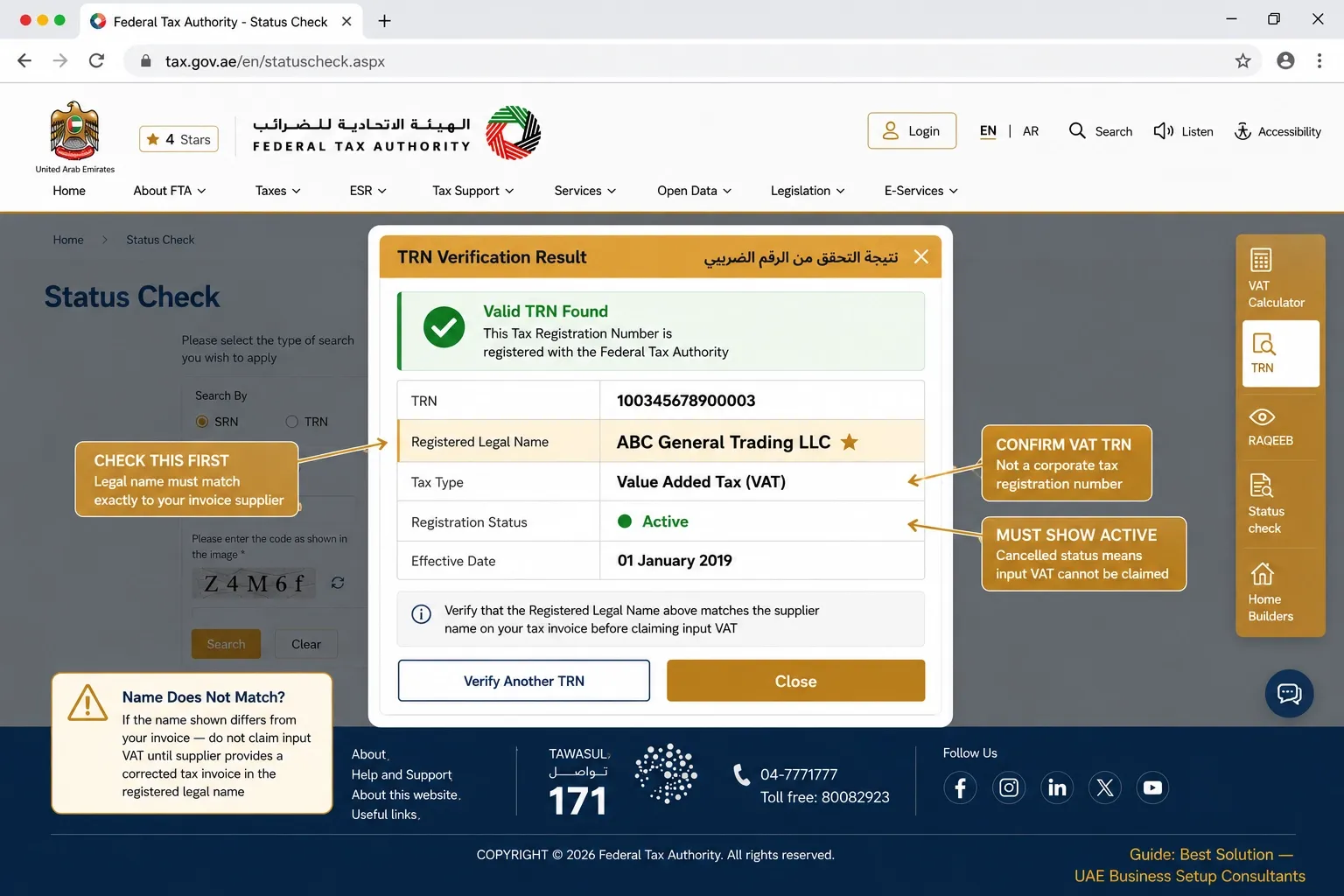
- Submit, and read the result, in particular the legal name shown against the number.
- Cross-check that name against the supplier on your invoice.
Verify by company name
If you have a supplier name but not their TRN, switch the search type from TRN to Name. Enter the legal entity name as it appears on the trade licence, not a shortened brand or trading name, since the FTA matches the registered name. This is the route to use when an invoice carries no TRN at all, or when you want to confirm which legal entity actually holds a number.
Verify using the UAE Tax mobile app
The FTA also offers the UAE Tax mobile app, which includes the same TRN verification function. It is convenient for spot-checks away from a desk, and returns the same registered-name result as the web portal.
What your result means: valid, invalid, or name mismatch
Getting a result takes seconds. Reading it correctly is where the value is. There are three outcomes, and a valid number is not automatically a safe one:
| Result | What It Means | What To Do |
|---|---|---|
| Valid, name matches | The TRN exists and belongs to the business on your invoice. | Proceed and treat VAT as normal. |
| Valid, name does NOT match | The number is real but registered to a different legal entity (often a brand name vs the licensed entity). | Pause. Ask for an invoice in the correct registered legal name before claiming. |
| Invalid / not found | The number does not exist, was mistyped, or belongs to a deregistered entity. | Do not claim input VAT. Request a corrected, valid tax invoice. |
Why TRN verification protects your business and your VAT claims
Under UAE VAT law, only a VAT-registered supplier can charge VAT, and you can only recover input tax on a valid tax invoice from that supplier. If the TRN is invalid or the legal name does not match, the document is not a valid tax invoice, and the input tax claim is disallowable. The cost of getting this wrong has two parts: you lose the credit, and you can be penalised on the resulting shortfall.
The penalty regime changed on 14 April 2026 under Cabinet Decision No. 129 of 2025. The headline figures every finance team should know: late VAT registration is penalised at AED 10,000. A return error with a tax impact of AED 10,000 or less can be corrected in your next return, while an error above AED 10,000 requires a Voluntary Disclosure (Form VAT 211), filed through EmaraTax within 20 business days of discovery. A voluntary disclosure made before the FTA issues an audit notice carries a penalty of 1% per month of the underpaid amount; filing after an audit notice adds a 15% fixed surcharge on top. The lesson is simple: catching an invalid TRN before the FTA does is what keeps the cost small.
Beyond the numbers, a verified TRN protects credibility. It signals to clients, suppliers, and the FTA that your records are clean and your due diligence is real, which matters every time you are audited or onboarded as a vendor.
When a TRN will not verify: common problems and fixes
A number can be genuinely valid yet still fail to verify. Work through these before concluding a supplier is unregistered:
- Input errors. Spaces, dashes, copied hidden characters, or a number that is not 15 digits. Retype it by hand.
- Recently issued TRN. A new registration can take 24 to 48 hours to appear in the public tool. Try again after two business days.
- Branch vs head office. Multi-entity and franchise setups sometimes have separate numbers. Confirm which legal entity should appear on the invoice.
- Captcha or browser issues. Refresh, clear the cache, or switch browsers.
- EmaraTax migration lag. After the move to EmaraTax, a subset of valid registrations returned no result or a mismatch in the public lookup for two to six weeks, even though the registration was correct in the FTA system. This needs direct FTA engagement to resolve; the self-service portal will not fix it.
- Since corporate tax registration became mandatory, EmaraTax issues separate reference numbers for VAT and for corporate tax for the same entity. We increasingly see a corporate tax registration number presented on a VAT tax invoice (or the reverse).
- A CT registration number is genuinely issued by the FTA, so it looks correct, but it is not a valid TRN for VAT. The invoice fails VAT compliance even though the number is real. Always confirm you are looking at the VAT TRN.
What we see in real UAE VAT reviews
These patterns come from Best Solution client files, not from published guides:
The case that proves the point. A trading company came to us during a VAT return review. As part of our compliance checks we verified the TRNs on their supplier tax invoices and found several with incorrect or mismatched numbers, totalling AED 14,000 of input tax across two tax periods. Claiming it would have exposed them to disallowance and a penalty in an FTA review. We flagged it, had the suppliers reissue corrected invoices, and filed a voluntary disclosure before any audit notice. The client recovered the input VAT legitimately, the penalty exposure was minimised, and the whole correction took three weeks. We then built a pre-return supplier TRN check into their process, and the next two periods had zero disallowable claims.
Supplier TRNs fail more often than teams expect. Across our trading-sector VAT reviews, roughly one in eight supplier TRNs checked in a typical quarter either fails verification, belongs to a different entity, or shows a cancelled registration. Businesses that have never run a systematic check are usually sitting on two to four periods of returns, each carrying at least one disallowable claim.
The EmaraTax lookup trap. We have handled several cases where a client’s own TRN was valid but unverifiable to their customers for weeks after the EmaraTax migration. In one, a customer withheld payment pending verification; we confirmed the registration through our tax agent channel and provided the FTA confirmation reference, and payment was released in four working days.
How to build a supplier TRN verification process
The single most common mistake we see is booking input tax on a supplier invoice without ever confirming the TRN is valid and matches the supplier’s registered legal name. The fix is not to verify every invoice on receipt, which is operationally unrealistic, but to run a focused check before each return:
List every new supplier that appears in the tax period.
- Verify each supplier TRN on the FTA portal, checking both validity and the legal name.
- Flag any invalid, cancelled, or mismatched number and request a corrected tax invoice before filing.
- Keep a dated record of each check as audit evidence of due diligence.
Larger finance teams can automate the same logic inside ERP or accounting software, validating TRNs at the point of supplier onboarding so problems surface before the first invoice is booked.

Is Your Next UAE VAT Return 100% Compliant?
In our client reviews, roughly 1 in 8 supplier TRNs has an issue—from simple typos to completely cancelled registrations that invalidate your input VAT claims. Let Best Solution's in-house VAT team run a comprehensive pre-filing health check on your supplier ledgers.
When to handle it yourself, and when to get help
Verifying a TRN is a one-minute task, and you do not need a consultancy for it. What needs professional input is everything that follows a failed check: amending a return to remove a disallowable claim, filing a voluntary disclosure before the FTA audits, judging whether a penalty applies and whether it can be reduced, and rebuilding the process so the error does not recur.
There is also no materiality threshold on input tax disallowance. A small invalid claim is treated the same in law as a large one. As an FTA-registered tax agent operating in the UAE since 2014, Best Solution’s in-house VAT and tax team handles TRN and corporate tax registrations, EmaraTax filings, VAT return reviews, and voluntary disclosures, and can represent you directly before the FTA. If a verification has turned up a problem, our VAT services team can help you correct the position before it becomes a penalty.